
Cat's Health
LiveFeeding, weight, vomiting, documents, medication and vaccinations for the cats of a household, shared by everyone who looks after them. Scan the can you are opening and the meal is logged; when a dose is due, every screen on every device in the household says so.
Every cat has a profile with its microchip and TASSO numbers, and every weighing, incident, vet document, drug plan and vaccination belongs to a cat. A barcode or a photo of the label identifies the food, portions and grams are worked out from the food database, and ratings show over time which foods and meal times work best. Drug plans produce the day’s doses, a banner that can’t be dismissed stays on screen until someone marks the dose as given, and vaccinations show when each one is due again.
Who it is for
Households with one or more cats where several people share the feeding, the medication and the visits to the vet.

What it does
Feeding
- Scan a can by barcode (works offline), by a photo of the label, or by typing the number
- Portions per cat, in containers and grams
- Your own meal times, extra feedings, and a rating per cat
- Rankings of the most-fed food, the best-rated food and the best-rated meal times
Food database
- Brand, name, EAN barcode, content per container and typical serving per cat
- Archive a food with a reason; its history stays
Cats
- Profile with gender, neutered, date of birth, breed, fur and eye colour, and a photo
- Microchip number and TASSO ID
- Mark a cat as deceased; its history is kept
Weight and vomiting
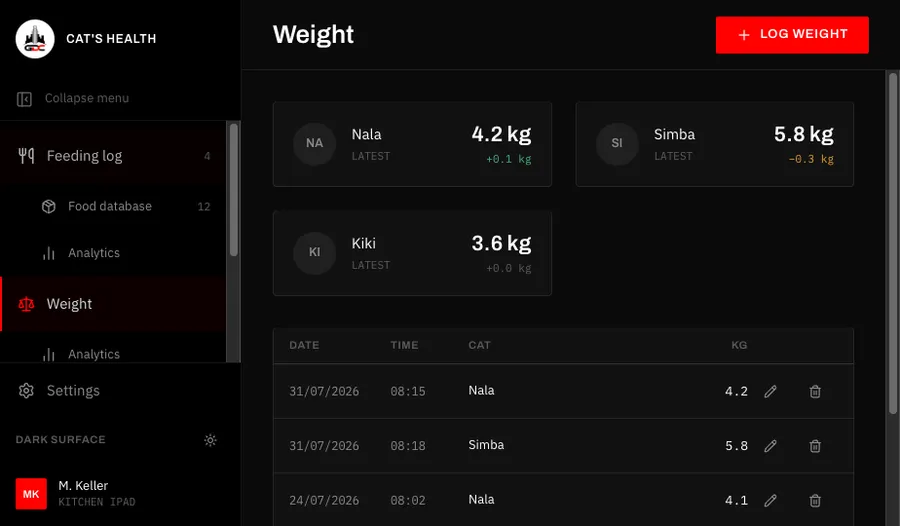
- Weighings in kg with the change since the last one, and a weight chart per cat
- Incidents with colour, food, hair and a remark
- A 30-day count, the longest clear run and a 90-day timeline
Medication and vaccinations
- Drug plans with up to eight times a day, every day or every 2 to 30 days
- A two-week calendar, a due-dose banner on every screen and a badge on the menu
- Medication history, with corrections to the time and the dose
- Vaccinations with vet and batch number, the next due date, and the status up to date, due soon or overdue
Documents
- Vet reports, lab results and invoices as PDF, JPG or PNG up to 20 MB
- Filter by cat and by kind; open in the browser or download
Excel import
- Foods and feeding log, weighings, or vomiting incidents from an .xlsx file
- Columns are mapped by hand, and skipped rows can be fixed in the app
Where it runs
A web app that runs in the browser on an iPad, a phone or a computer, and can be added to the home screen to open full screen like a normal app. It updates itself, keeps cats, foods and settings available when the connection drops (saving needs a connection), and is in English and German.
Getting access
You sign in with a GDC account created in the GDC Tools Manager. Create it from the app’s sign-in screen, and access to Cat’s Health is requested for you once you confirm your e-mail address; an administrator then grants it. Everyone in your household sees and edits the same cats and records.
Every screen is explained step by step in the guide.
GDC Tools Manager
Registration and sign-in run through the GDC Tools Manager. One e-mail address and password open every tool an administrator has activated for you, and your household decides who shares your data.
New here? Start with the guide- 01 One account for every GDC tool Register once and confirm your e-mail. The same login opens every GDC tool you have access to.
- 02 Request a tool, an administrator grants it Ask for the tools you need under My tools, and you get an e-mail once an administrator decides. Sign up from an app, and access to that app is requested for you.
- 03 Households share one workspace Cats, recipes and trips belong to the household, not to a single person. Household admins invite people by e-mail, and everyone in the household sees the same data.