
The Recipe Book
LiveA shared recipe book for one household: recipes come in from websites, public Instagram posts, photos and PDFs, are read by AI and checked by you before saving. Dinners are planned around your shopping day, and one shopping list covers the whole shopping cycle.
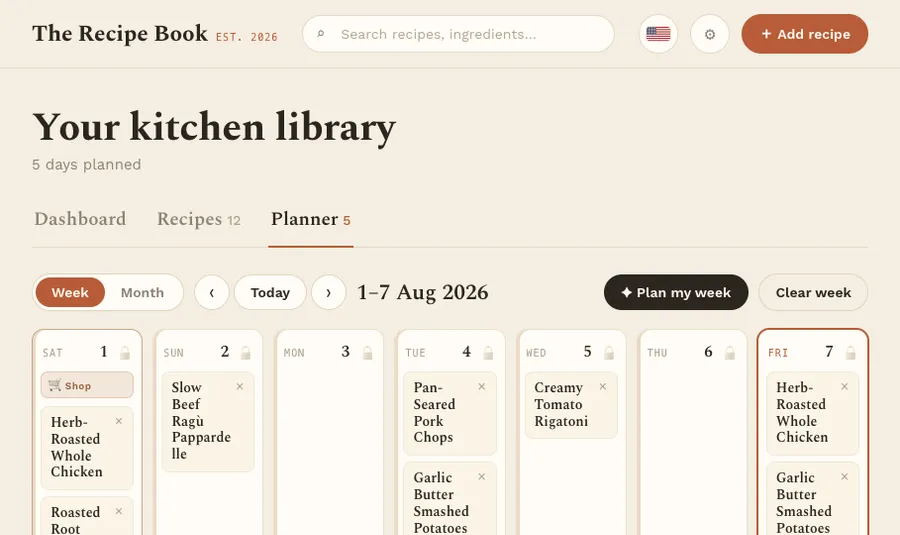
Everyone in a household works from the same recipe book, meal plan and shopping list. A recipe starts in testing, is cooked and judged, and only then joins the rotation that the planning assistant picks dinners from, while taking season, quick weekday dishes and kitchen appliances into account. The shopping list builds itself from the plan, merges amounts and sorts lines by supermarket aisle.
Who it is for
Households that cook dinner at home and want one shared place for their recipes, the week’s plan and the shopping list.
What it does
Adding recipes
- Four ways in: a website link, a public Instagram post, a photo or PDF, or by hand
- AI reads the recipe and suggests categories and tags from your own lists
- Every imported recipe opens for review and is only saved once you confirm it
Recipe book
- Search by title, ingredient or tag
- Statuses Testing, Active and Archived; only active recipes are suggested
- Ratings from one to five stars, and favourites
Cooking
- Scale the servings; the amounts are recalculated
- AI translation between English and German
- Original, metric or US units
- A step-by-step cooking mode, and “How was it?” after a test recipe
Planner
- A week view that starts on the shopping day, and a month view
- Several dishes per day, planned and moved by dragging
- Lock a day so the assistant leaves it alone
Planning assistant
- Proposes dinners for a whole shopping cycle; reroll or skip single days, then accept
- Builds dinners from a main dish, or from a protein, a side and a vegetable
- Weighs season, quick weekday dishes, recent repeats and appliance capacity
- Up to four cook-free nights, and tags it should never suggest
Shopping list
- Built automatically for each shopping cycle, with identical ingredients merged
- Grouped by supermarket aisle, in one unit system
- Staples folded away under “Check your pantry”
- Ticks are shared, so two people can shop from the same list
Dashboard
- Today’s dinner, and a countdown to the next shopping day
- Recipes awaiting a verdict
- Most cooked, needs a turn, and highest rated
Where it runs
A web app that runs in the browser on computers, tablets and phones, with a compact layout for phones. On iPad or iPhone it can be added to the home screen from Safari and opens full screen. It is in English and German, set per device, updates itself and syncs with the household’s other devices about every minute.
Getting access
You sign in with a GDC account, the same sign-in as the other GDC tools. Create it from the app’s sign-in screen, and access to The Recipe Book is requested for you once you confirm your e-mail address; an administrator then grants it. The members of a household share one recipe book, plan, shopping list and settings.
Every screen is explained step by step in the guide.
GDC Tools Manager
Registration and sign-in run through the GDC Tools Manager. One e-mail address and password open every tool an administrator has activated for you, and your household decides who shares your data.
New here? Start with the guide- 01 One account for every GDC tool Register once and confirm your e-mail. The same login opens every GDC tool you have access to.
- 02 Request a tool, an administrator grants it Ask for the tools you need under My tools, and you get an e-mail once an administrator decides. Sign up from an app, and access to that app is requested for you.
- 03 Households share one workspace Cats, recipes and trips belong to the household, not to a single person. Household admins invite people by e-mail, and everyone in the household sees the same data.