
Season Planner
LiveThe NFL and college football season from Germany: every kickoff in Berlin and US Eastern time, and where each game can be watched in Germany. Star the games you want, get a push reminder before kickoff, and keep scores hidden until you have seen them.
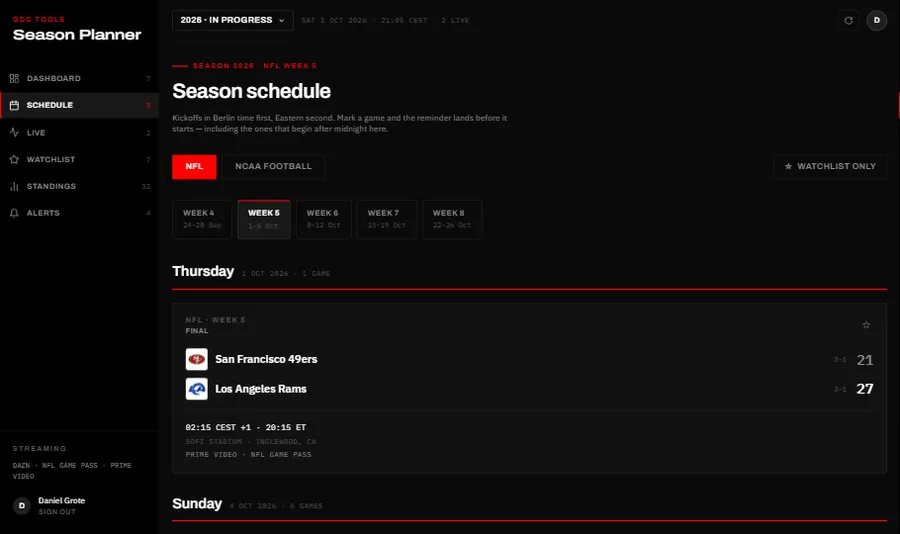
The schedule runs week by week, NFL and college football apart, with each game’s kickoff in Berlin time, its stadium and a stream line that checks free TV first, then the services you selected. Starred games collect on a watchlist with reminders one hour before or at kickoff, quiet hours for night games and a warning when two kick off at the same minute. Scores can stay hidden until you mark a game as watched; live games update every 20 seconds.
Who it is for
People in Germany who follow the NFL or college football and plan around kickoffs late in the evening or overnight.

What it does
Schedule
- NFL and college football as separate calendars, week by week, preseason and playoffs included
- Berlin time first, then US Eastern time; “+1” marks a next-day start in Germany
- Planning, in-progress and archived seasons
Watching in Germany
- The stream line checks free TV (RTL, NITRO) first, then the services you selected
- Services to choose from: DAZN NFL Game Pass, DAZN NCAA, Sky / WOW and RTL+
- “Late night” marks kickoffs before 06:00 German time
Watchlist
- Star games, and see how many are watched and how many hours are still to watch
- A warning when starred games kick off at the same minute
- You mark finished games as watched yourself
Reminders
- One hour before (on by default) or at kickoff, by push
- Quiet hours from 01:00 to 07:00, with “Remind anyway” for single games
- An optional Friday e-mail with the weekend’s starred games
Hidden scores
- Hide no scores, the watchlist’s, or every score
- A hidden score shows as •••, and a tap reveals it
- Watched games always show their score
Live
- Every game in progress with score, quarter, clock, possession, and down and distance, every 20 seconds
- “Starting next” for kickoffs within half an hour
- A countdown to your next starred game
Teams and standings
- Follow teams; they stay followed from season to season
- NFL divisions, college conferences and the AP Top 25
- Team pages with record, points per game and points allowed
Where it runs
A web app for phone, tablet and computer, in English and German, with schedule and scores from ESPN. On iPhone and iPad it has to be added to the home screen through Safari for push reminders; on Android and on computers, installing it through Chrome or Edge is optional.
Getting access
You sign in with a GDC account created in the GDC Tools Manager. Create it from the app’s sign-in screen, and access to the Season Planner is requested for you once you confirm your e-mail address; an administrator then grants it.
Every screen is explained step by step in the guide.
GDC Tools Manager
Registration and sign-in run through the GDC Tools Manager. One e-mail address and password open every tool an administrator has activated for you, and your household decides who shares your data.
New here? Start with the guide- 01 One account for every GDC tool Register once and confirm your e-mail. The same login opens every GDC tool you have access to.
- 02 Request a tool, an administrator grants it Ask for the tools you need under My tools, and you get an e-mail once an administrator decides. Sign up from an app, and access to that app is requested for you.
- 03 Households share one workspace Cats, recipes and trips belong to the household, not to a single person. Household admins invite people by e-mail, and everyone in the household sees the same data.