
Travel Planner
LivePlan a trip as stops and nights, together with your household. Every date follows from the start date and the nights. Flights, beds and hire cars are compared until one is chosen, and the budget, to-dos and open decisions show what is still missing.
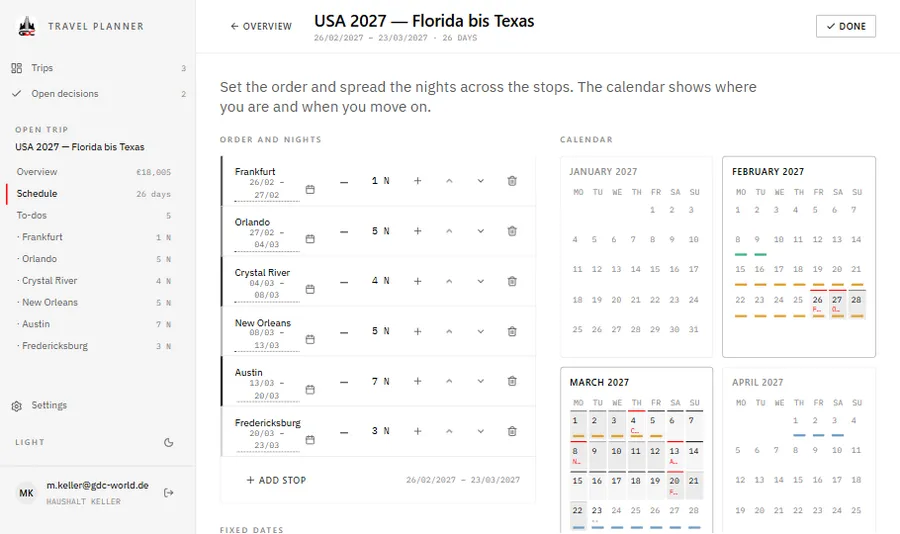
A trip keeps only its start date and the nights at each stop. Arrivals, departures and the calendar are worked out from these, so one more night moves everything after it. At each stop you collect lodging, flights and hire cars as options until one is the favourite or booked, while events and meals all count. Totals, the budget and the list of open decisions follow from those choices, and the household shares every trip.
Who it is for
Households, such as families, who plan trips together and want the route, the bookings and the costs in one shared place.
What it does
Route and schedule
- Stops with nights; every date is worked out from the start date
- Set an arrival date and the stop before it adjusts
- A year calendar with fixed dates such as school holidays
- A route map of the stops
Options at each stop
- Lodging, flights, hire car, events and food
- Candidates with price, link, picture and address; a favourite, then booked
- Archive an option with a reason instead of deleting it
- A hire car is carried across stops and billed once
Days and itinerary
- Drag events, meals and the car pick-up onto the days of a stay
- Day by day: the whole trip as one chapter per stop
- Entries that lose their day when a stay gets shorter are collected, not moved by guesswork
Prices and budget
- Price checks with a price history
- A budget filled from the chosen options, plus extra costs
- Down payments and payments, with what is paid and what is open
- The total, the cost per day and a breakdown by category
To-dos and decisions
- To-dos per trip, with the people responsible and due dates
- Open decisions: a bed at every stop, flights, an event at stays of four nights or more
- Overdue and soon-due to-dos are flagged
Sharing and records
- The household edits the same trips, and conflicting saves are caught
- PDFs and pictures such as tickets, up to 15 MB each
- A full-screen presentation of places and dates, without prices
- Export a whole trip as one file
Where it runs
A web app for computers, tablets and phones, with a layout for narrow screens. On iPad or iPhone it can be added to the home screen from Safari and opens full screen. It is in German and English, set per device, and the help guide is built into the app.
Getting access
You sign in with your GDC account from the GDC Tools Manager. Create it from the app’s sign-in screen, and access to the Travel Planner is requested for you once you confirm your e-mail address; an administrator then grants it. The members of your household share all trips.
Every screen is explained step by step in the guide.
GDC Tools Manager
Registration and sign-in run through the GDC Tools Manager. One e-mail address and password open every tool an administrator has activated for you, and your household decides who shares your data.
New here? Start with the guide- 01 One account for every GDC tool Register once and confirm your e-mail. The same login opens every GDC tool you have access to.
- 02 Request a tool, an administrator grants it Ask for the tools you need under My tools, and you get an e-mail once an administrator decides. Sign up from an app, and access to that app is requested for you.
- 03 Households share one workspace Cats, recipes and trips belong to the household, not to a single person. Household admins invite people by e-mail, and everyone in the household sees the same data.